# 短代码
短代码是 Facile 主题提供的一种特殊语法,通过短代码可以插入一些特殊样式的内容。
Facile 主题的短代码使用的是类似于 WordPress Shortcode 和 BBCode 风格的方括号语法。
常见的短代码类似:
[alert]提示框[/alert]

[alert type="info"]提示框[/alert]
其中的 type 是样式属性,内容包裹在两个方括号的中间,结尾的方括号会有一个 / 结尾符,类似于 HTML。
目前支持的短代码还不多,后续会增加更多。
# 提示框
下面是提示框的语法:
[alert type="primary"]Typecho博客主题primary[/alert]

[alert type="info"]Typecho博客主题info[/alert]

[alert type="success"]Typecho博客主题success[/alert]

[alert type="secondary"]Typecho博客主题success[/alert]

[alert type="danger"]Typecho博客主题danger[/alert]

[alert type="warning"]Typecho博客主题warning[/alert]

[alert type="dark"]Typecho博客主题dark[/alert]
效果如下:

不加 type 属性默认使用 primary 样式。
# 链接按钮
链接按钮就是按钮样式的链接。
下面是链接按钮语法:
[button url="http://example.com" type="primary"]按钮primary[/button]

[button url="http://example.com" type="info"]按钮info[/button]

[button url="http://example.com" type="success"]按钮success[/button]

[button url="http://example.com" type="secondary"]按钮secondary[/button]

[button url="http://example.com" type="danger"]按钮danger[/button]

[button url="http://example.com" type="warning"]按钮warning[/button]

[button url="http://example.com" type="dark"]按钮dark[/button]
链接按钮样式如下:

url 里就是链接地址,不加 type 默认使用 primary 样式。
# 折叠框
折叠框是一种可以展开和收起的内容容器。
下面是折叠框语法:
[collapse title="点击查看折叠内容"]
这就是被折叠的内容。
[/collapse]
折叠框样式如下:

title 是折叠框显示的标题。
# 并排显示
并排显示可以实现并排显示多张图片,也可以是图文并排显示。
下面是3段并排显示的短代码:
下面是并排显示的图片:
[row]
[col]  [/col]
[col]  [/col]
[/row]
图文并排
[row]
[col]  [/col]
[col]
鸣沙山月牙泉风景名胜区,位于敦煌城南五公里,沙泉共处,妙造天成,古往今来以“沙漠奇观”著称于世。
鸣沙山以沙动成响而得名。东汉称沙角山,俗名神沙山,晋代始称鸣沙山,其山东西长40余公里,南北宽约20公里,主峰海拔1715米。
峰恋危峭,山脊如刃,经缩复初;人乘沙流,有鼓角之声,轻若丝竹,重若雷鸣,此即“沙岭晴鸣”。
[/col]
[/row]
三张图片
[row]
[col]  [/col]
[col]  [/col]
[col]  [/col]
[/row]
外层使用 row ,行内使用 col 包裹内容。
宽度是平均分配的,如果一个 row 里只有一个 col,宽度就是 100%,一个 row 里有两个 col,每个的宽度就是接近 50%。
col 里可以放任何内容,图片、文字、列表、按钮 都可以。
下面是并排显示的效果:
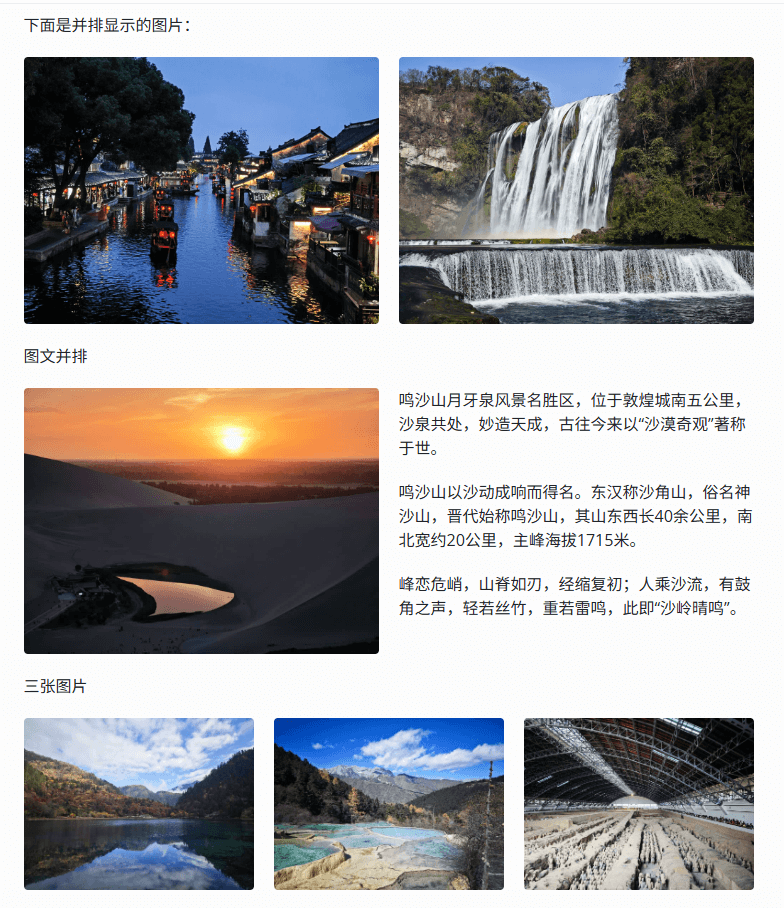
考虑到手机的屏幕比较窄,在手机上会变为一列显示。
# 徽章
徽章是一种外形类似标签的元素,经常逛 Github 的,对徽章 badge 应该不陌生。
下面是徽章的语法:
[badge type="primary" url="https://www.misterma.com"]徽章primary[/badge]

[badge type="success"]徽章success[/badge]

[badge type="danger"]徽章danger[/badge]

[badge type="warning"]徽章warning[/badge]

[badge type="info"]徽章info[/badge]

[badge type="light"]徽章light[/badge]

[badge type="dark"]徽章dark[/badge]
徽章样式如下:

type 是样式,不加 type 默认使用 primary 样式。
url 是可选的链接地址,不加 url 解析为 span 普通文本,加 url 解析为 a 链接。
# 隐藏内容
主题提供的隐藏内容可以实现让文章的部分内容隐藏,可以设置为登录才能查看,或者评论才能查看。
下面是隐藏内容的短代码:
[hide type="comment"]隐藏内容[/hide]

[hide type="login"]不让看[/hide]
隐藏后的效果如下:

type="comment" 需要在文章页发送评论,评论通过审核后才能查看,登录也能查看。
type="login" 只有登录才能查看。
不加 type 默认是评论查看。
# 进度条
下面是进度条短代码:
[progress type="primary"]60[/progress]

[progress type="info"]60[/progress]

[progress type="success"]60[/progress]

[progress type="danger"]60[/progress]

[progress type="warning"]60[/progress]

[progress type="dark"]60[/progress]
进度条效果:

type 设置进度条样式,不加 type 默认显示 primary 样式。
进度条的进度数字直接包裹在短代码中间,数字不需要加 %。
# 选项卡
选项卡(又称标签页)是一种用户界面控件,通过切换不同的标签项在同一屏幕区域展示对应内容,从而节省界面空间并优化信息布局。
下面是选项卡的短代码:
[tabs]
[tab title="第一项"]这是第一项的内容[/tab]
[tab title="第二项"]这是第二项的内容[/tab]
[/tabs]
选项卡效果:

外层是 tabs ,标签页用 tab ,title 是标题,内容包裹在标签页中间。
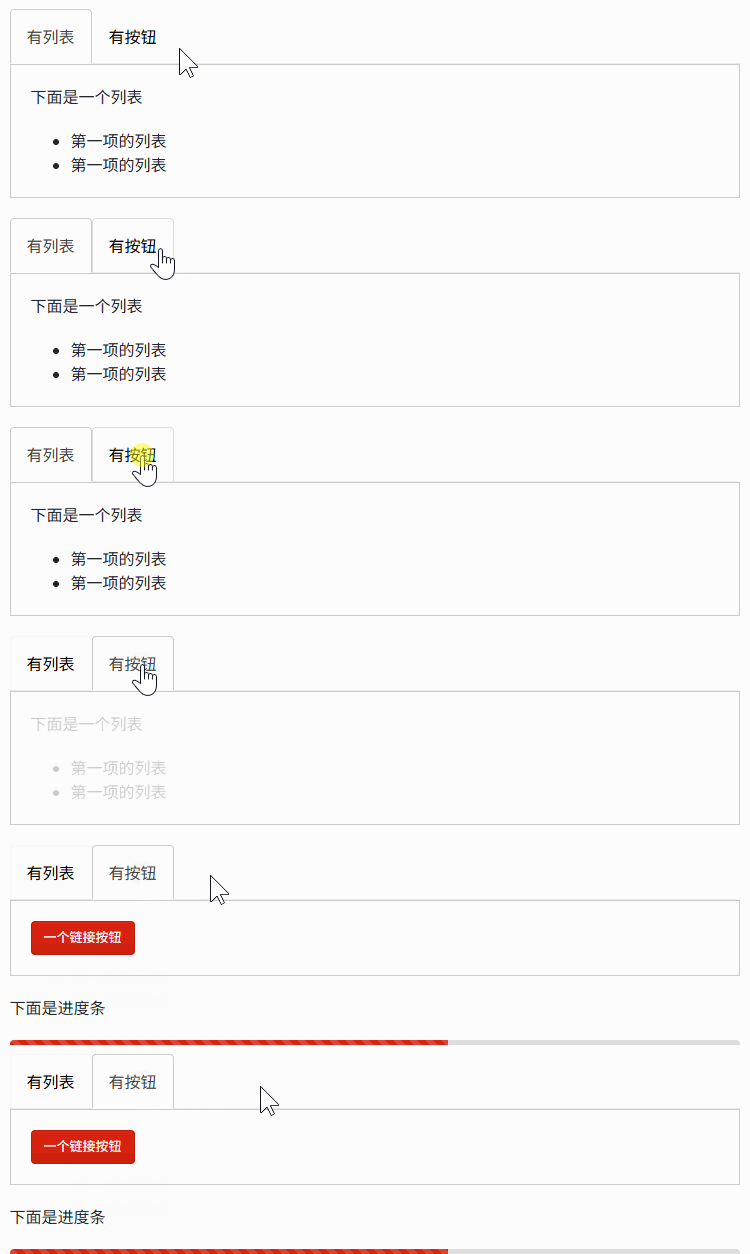
在选项卡内插入一个列表和按钮短代码:
[tabs]
[tab title="有列表"]
下面是一个列表

* 第一项的列表
* 第一项的列表
[/tab]
[tab title="有按钮"]
[button url="https://www.misterma.com"]一个链接按钮[/button]
[/tab]
[/tabs]
效果如下:
# 可访问性
所有的可交互组件,包括 collapse 折叠框和 tab 选项卡,都支持屏幕阅读器和键盘操作。